Unlocking Peak Performance: The Power of Next.js Server Components
Unlocking Peak Performance: The Power of Next.js Server Components
The landscape of web development is in constant motion, driven by an insatiable demand for faster, more dynamic, and ultimately, better user experiences. In this race for performance and efficiency, Next.js has consistently been at the forefront, pushing boundaries with innovative features. Among its most transformative introductions are Server Components – a paradigm shift that redefines how we build modern web applications.
For years, the industry has grappled with the challenge of client-side JavaScript bloat. As applications grew more complex, so did the bundles shipped to the browser, often leading to slower initial page loads and a degraded user experience. Next.js Server Components offer a powerful solution by allowing developers to render components entirely on the server, sending only the necessary HTML and CSS to the client, along with minimal interactive JavaScript.
What Exactly Are Next.js Server Components?
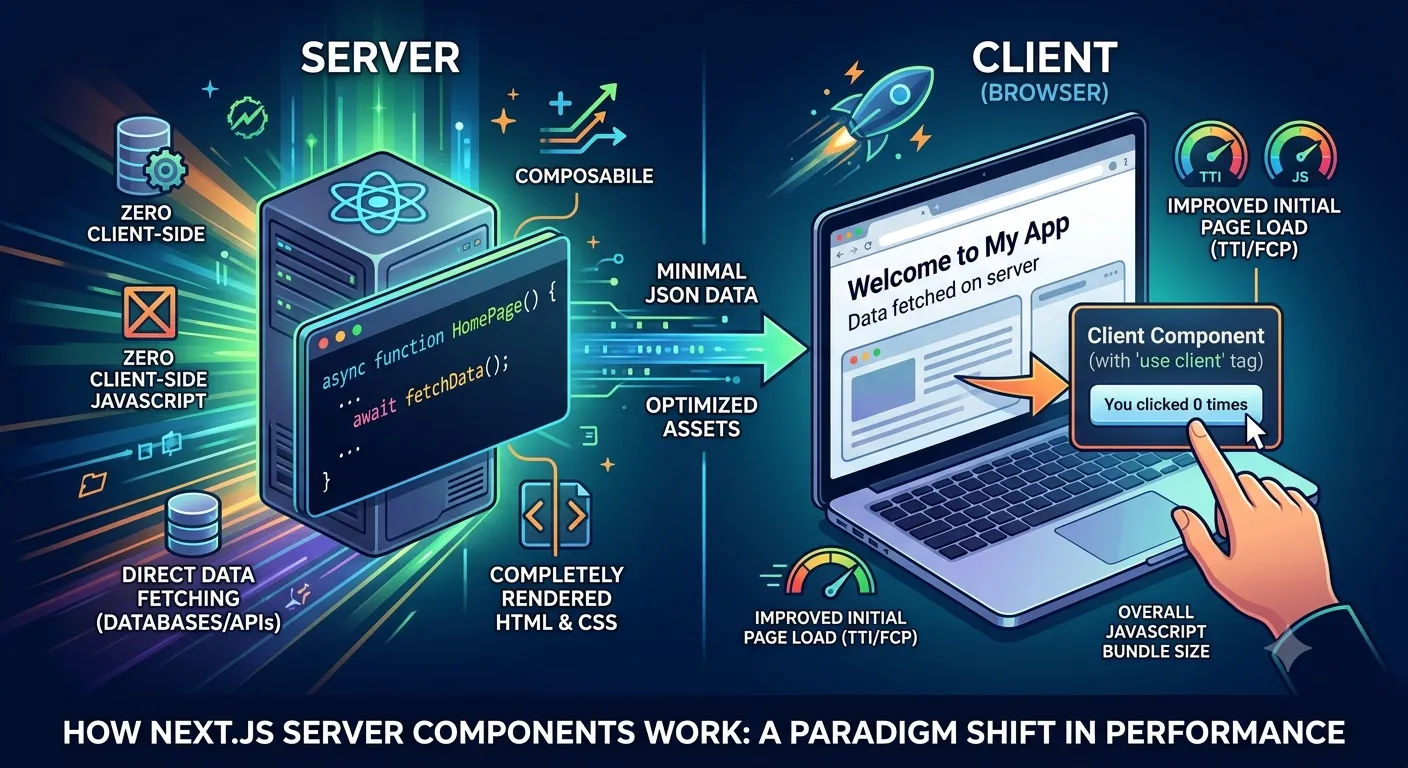
At its core, a Server Component is a React component that renders exclusively on the server. Unlike traditional client-side components (which Next.js refers to as Client Components), Server Components never make it to the client's JavaScript bundle. This means:
Zero Client-Side JavaScript: Components that don't require client-side interactivity can be completely removed from the browser's bundle, leading to significantly smaller downloads.
Direct Data Fetching: Server Components can directly access server-side resources like databases, file systems, or API keys without needing client-side API calls. This simplifies data fetching logic and keeps sensitive information off the client.
Improved Initial Page Load: Since less JavaScript needs to be downloaded, parsed, and executed by the browser, the Time to Interactive (TTI) and First Contentful Paint (FCP) metrics see substantial improvements.
Enhanced Security: Keeping server-side logic and data fetching on the server reduces the attack surface and helps protect sensitive data that would otherwise be exposed in client-side bundles.
This approach complements other performance optimization techniques. Just as optimizing your images is crucial for speed – by leveraging modern formats as discussed in Why WebP is Better Than PNG/JPG: The Ultimate Guide to Next.js 15 Image SEO – optimizing your JavaScript delivery with Server Components delivers another significant performance boost.
Client Components vs. Server Components: Finding the Balance
It's important to understand that Server Components don't replace Client Components; they augment them. The optimal strategy involves using Server Components for static or server-dependent parts of your UI and Client Components for interactive elements (e.g., counters, forms with client-side validation, UI state management). Next.js provides clear conventions to differentiate between the two, typically by marking Client Components with "use client" at the top of the file.
TypeScript
// app/page.tsx (Server Component by default)
import Counter from './counter';
import prisma from '@/lib/prisma'; // Fetching directly on the server

export default async function HomePage() {
  const data = await prisma.post.findMany({
    take: 3,
    select: { id: true, title: true }
  });

  return (
    <div className="p-6">
      <h1>Welcome to My App</h1>
      <p>Latest Posts fetched directly from Database on server:</p>
      <ul>
        {data.map(post => <li key={post.id}>{post.title}</li>)}
      </ul>
      <Counter /> {/* This will be a Client Component */}
    </div>
  );
}
TypeScript
// app/counter.tsx
"use client"; // Marks this as a Client Component

import { useState } from 'react';

export default function Counter() {
  const [count, setCount] = useState(0);

  return (
    <button
      className="mt-4 px-4 py-2 bg-blue-600 text-white rounded"
      onClick={() => setCount(count + 1)}
    >
      You clicked {count} times
    </button>
  );
}
Practical Implications for Developers
For developers, Server Components mean a more streamlined workflow for data-rich applications. You can collocate data fetching directly within the components that need it. This dramatically simplifies the common pattern of fetching data, passing it down as props, and managing state overhead. To see how this scales with full routing and caching layers, explore our guide on Mastering Data Fetching and Caching in Next.js App Router.
Embracing this architecture is a key step towards building highly performant and scalable applications, especially for those who've chosen a modern stack over traditional CMS platforms. If you're pondering the benefits of a custom Next.js stack, you might find valuable insights in WordPress vs. Next.js 15: Why I Built My Professional Blog with a Custom Stack.
Moreover, efficient asset management, as outlined in Mastering Image Management in Next.js 15: Zero-Cost Guide to ImageKit and Prisma, combined with the power of Server Components, creates a truly optimized user experience. These technologies work in concert to deliver blazing-fast web applications while avoiding the traps of over-fetching.
The Future is Composable and Performant
Next.js Server Components represent a significant leap forward in web development, offering a powerful tool to build applications that are inherently faster, more efficient, and easier to maintain. By intelligently offloading work to the server and minimizing client-side overhead, they pave the way for a more performant and composable web. As you continue to build and optimize your Next.js applications, understanding and strategically implementing Server Components will be key to unlocking their full potential.